
Printer Detail View

Dive into any printer for a full view of its live camera feed, status, controls, and console output all on one page.
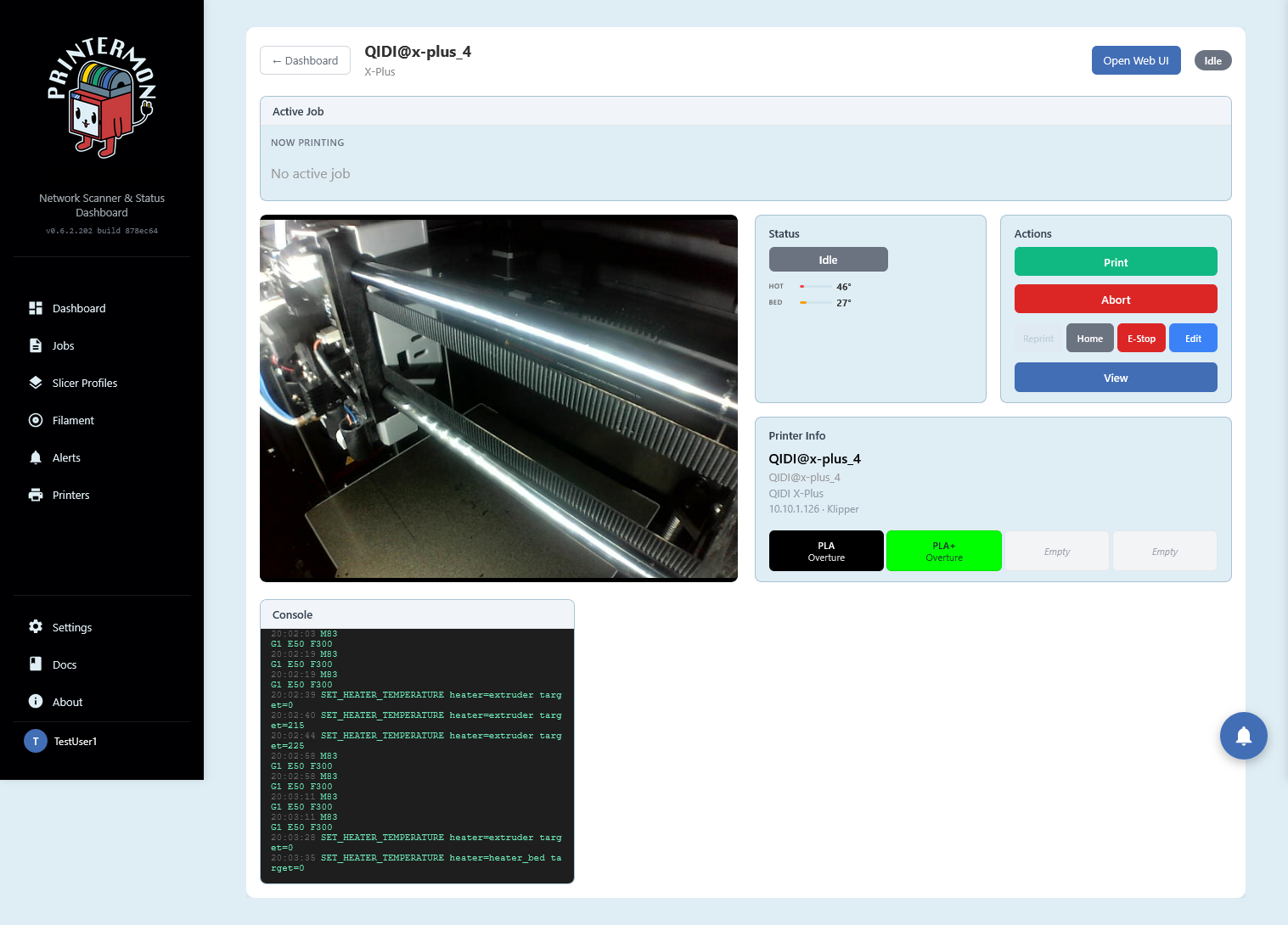
The Printer Detail page gives you everything you need to monitor and control a single printer without switching between tools. At the top, the active job panel shows what is currently printing. Below that, a live camera feed streams directly from the printer so you can visually check progress or spot issues. The status panel displays the current state along with real-time hotend and bed temperatures. The actions panel puts your most-used controls within reach: start a print, abort, reprint, home axes, trigger an emergency stop, or edit printer settings. The printer info section shows the printer name, model, IP address, firmware type, and which filaments are loaded in each slot, colour-coded for quick identification. A live console at the bottom streams raw G-code commands and responses in real time, useful for diagnostics or verifying that temperature changes and movements are executing as expected. A link to the printer's own web UI is always available in the top corner for when you need full native access.
Coming soon, job and printer history panel - able to show and quickly retrigger jobs that have been run on this machine. Machine queue panel - put together a list of jobs to run on this printer next.